


Kwikpic - Smart Photo Sharing
3.78.00 Reviews
App Specs
- Version
- 15.8
- Updated On
- License
- Free
- Downloads
- 1,000,000+
- Developer
- Kwikpic Ai Solutions Private Limited
- Categories
- Events
- Platform
- Android, iOS
Screenshots
 Analysis by AppCompare
Photo sharing can feel easy during the event and oddly tedious afterward: pictures end up scattered across phones, chats and folders, while everyone asks who has the group shot. I like the idea behind Kwikpic - Smart Photo Sharing because it treats that handoff as part of the occasion rather than another chore to postpone. The app is free and sits in the events category, so its appeal is less about editing individual pictures and more about bringing shared moments together. Whether that habit lasts depends on how often you organize events and whether the people you share with are willing to use a dedicated app.
The first-week appeal: less chasing, more sharing
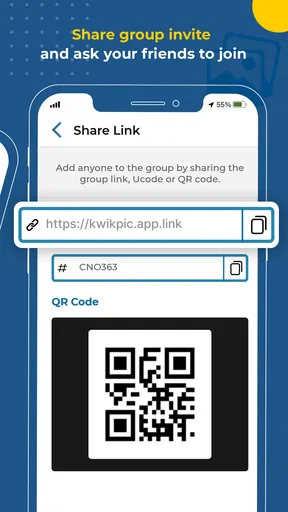
In the first few days, an event photo app can feel like an obvious upgrade. Instead of asking several guests to send their pictures one by one, you can use a shared space for the occasion and give people a clear place to contribute. That is especially appealing after a family gathering, a team celebration or a weekend away, when different people have captured different parts of the same story.
A realistic example is a birthday dinner where one person takes portraits, another catches candid moments and someone else photographs the cake. The useful question is not just whether the pictures can be shared, but whether everyone can find the same destination without a long explanation. I would introduce the app before the event, while people are already discussing plans, rather than waiting until afterward to persuade a group to install something and locate an album.
Kwikpic is made by Kwikpic Ai Solutions Private Limited, and its event-focused purpose gives it a more specific job than a general photo library. It has a 3.7 average from around 3,100 ratings and has passed 1 million installs. Those figures suggest a real audience, but they do not tell me whether every friend or relative will be comfortable joining a new sharing routine. The practical test is whether the people in your circle actually use the shared space after the first invitation.
From a successful event to a lasting habit
The lasting value is different from the first-week novelty. A shared event album earns its place when people return to it to add missing photos, revisit a moment or find a particular image without searching old conversations. If your year includes regular gatherings, clubs, school events or group trips, that repeated use can make a dedicated event app more convenient than starting a fresh message thread every time.
If you only need to send a handful of pictures to one person, your phone’s built-in sharing or a familiar messaging app may be quicker. Those options have a major advantage: the recipient probably already knows how to use them. Kwikpic makes more sense when the group is large enough that one-to-one forwarding becomes messy, or when you want the occasion—not the chat history—to be the organizing idea.
To make the habit stick, I’d keep the workflow simple: decide who is responsible for creating or sharing the event space, tell guests where to find it, and add photos soon after taking them. That avoids the common problem of returning home with pictures still scattered between devices. It also gives guests a reason to open the album while the event is fresh, rather than treating it as a project they may never get around to finishing.
Worth Reading Before You Choose

Baby Panda World Brings Quick Play to Modern Phones, but Its Game Library Feels Busy

ESPN’s Live Game View Makes Following Close Games Easier

QuizzLand Review: A Good Fit for Short Trivia Breaks, Not Every Player

Basketball Stars: Multiplayer Is Fast, but Can It Recover When Matches Go Wrong?

WEBTOON Turns Phone Updates Into a Better Reading Routine

Link to Windows Runs on Shared Habits, Not Social Feeds
Maintenance, privacy and the points that need care
Even a convenient shared album needs a little maintenance. Someone has to make the event easy to recognize, invite the right people and keep the sharing destination from getting lost among unrelated notifications or conversations. For a one-off occasion, that effort is modest but real; for a group that organizes events frequently, agreeing on a consistent approach can save repeated setup and confusion.
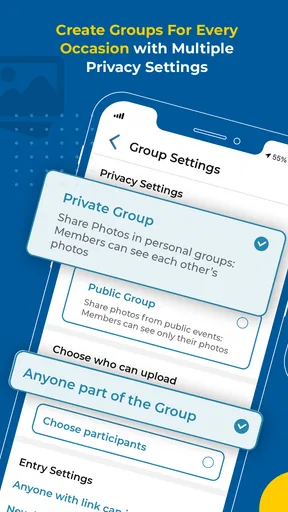
Privacy deserves the same attention as convenience. Before inviting a broad group, I’d check who can see and contribute to the shared material, and I’d be thoughtful about photos of children, guests who prefer not to be photographed, or moments that were meant to stay within a small circle. A private group does not remove the need for common sense: people can still save or share images outside the original context. I would set expectations with guests instead of assuming everyone has the same idea of what is okay to post.
The app is free, which makes trying it for an event straightforward, but the bigger cost is attention. If people have to learn a new routine for a single casual meetup, a familiar group chat may be the kinder choice. Kwikpic is best when its shared destination solves a recurring coordination problem, not when the organizer is adding another app simply because it is available.
Using Kwikpic for real occasions
As an events app, Kwikpic is aimed at people who want photos from a shared occasion to be easier to gather and pass around. Its Teen content rating is worth keeping in mind when deciding who in a family or group should use it. The current version is 15.8, and it supports Android 5.0 and later, which gives owners of older Android devices a clear starting point for checking compatibility. The app was released on July 26, 2022, so it is not a brand-new idea, though whether it becomes a regular tool still comes down to your group’s habits.
Where it fits better than the usual alternatives
Compared with sending photos through a chat, an event-oriented app can keep the occasion at the center instead of burying images under unrelated messages. Compared with a general cloud photo library, it can feel more purpose-built for collecting pictures from a group. The trade-off is adoption: chats and familiar storage tools are already part of many people’s routines, while a dedicated event space asks guests to follow a separate path.
I would choose Kwikpic for a reunion, a recurring club gathering or a group trip where many people take photos and the organizer wants one place to point everyone. I would skip it for a private exchange between two people, for an event where guests are unlikely to install or open another app, or when the main need is detailed editing rather than collection and sharing. A specialist editing app is a better fit for polishing images; a familiar messaging service can be better for a quick, informal handoff.
Small decisions that make sharing smoother
One useful trick is to agree on the album’s purpose before inviting people. Is it for every picture, only the best ones, or photos guests are comfortable sharing with the whole group? That small decision can prevent an event space from becoming a dumping ground for duplicates and accidental shots. For a longer trip, I’d also encourage people to add photos in stages instead of waiting until everyone is home and trying to sort a large backlog at once.
Another trade-off is curation. A large collection can preserve more viewpoints, but it can also make the photos people care about harder to find. If the event matters, appointing one person to flag or gather the favorites afterward can make the shared collection more useful without turning the occasion into a formal photography project. This is a human workflow choice, not a reason to expect the app to decide what matters to your group.
People often wonder whether a dedicated event app is worth the extra step, whether it can replace their usual photo storage, and whether everyone needs to participate for it to help. My view is that it is most useful as a gathering point for a particular occasion, not necessarily as a replacement for the photo library people already rely on. A few active contributors can still make a shared collection worthwhile, but the result will naturally be less complete if most guests never join in.
When the novelty fades
The main source of fatigue is not the idea of sharing; it is maintaining one more destination. If an organizer has to remind guests repeatedly, answer setup questions and chase uploads, the convenience can disappear. I’d judge the app after a couple of real occasions: did it reduce follow-up messages, and did anyone return to the shared pictures later? If the answer is no, there may be little reason to keep asking the group to change its habits.
Editing is another boundary. The app’s role is sharing and organizing, not replacing a dedicated editor for careful retouching or more involved adjustments. If you routinely need to refine images before showing them, it is sensible to edit elsewhere and use Kwikpic for the group handoff. That split workflow is not necessarily a flaw, but it does mean the app may not be the single tool you use from capture to finished picture.
There can also be friction when people have different expectations about quality, selection or privacy. Some guests want every candid shot included; others prefer a small set of polished highlights. Agreeing on what belongs in a shared event space makes the experience more comfortable and reduces the chance that one person’s enthusiasm becomes another person’s annoyance. I would not assume that everyone who attends an event automatically wants to contribute or be photographed.
My long-term verdict
For people who regularly gather photos from groups, Kwikpic has a clear reason to stay installed: it gives an occasion its own sharing destination and can spare the organizer from piecing together images across several chats. For occasional users, its value is more situational. A familiar messaging app may be enough for a small gathering, while a shared event space becomes more attractive as the number of contributors and pictures grows.
Overall, I see it as a practical option when the group has a recurring need, not an essential app for every phone. Its free access lowers the barrier to trying it, and its event-first focus is easy to understand, but the habit only lasts if guests find the process simple and the organizer does not have to manage every contribution. If your next gathering is likely to produce a lot of pictures from different people, it is worth trying. If you mainly share a few images with one or two friends, I’d stick with the tools they already use.
Getting started without creating extra work
First things first, downloading and setting up Kwikpic is a breeze. Available for both Android and iOS, you just grab it from the Play Store or App Store, and you’re ready to roll. Once installed, the app prompts you to sign up or log in, and you’re immediately greeted by a clean, user-friendly interface. I was pretty impressed by how intuitive it felt, even for someone like me who isn’t exactly a tech wizard.
Features That Make Kwikpic Stand Out
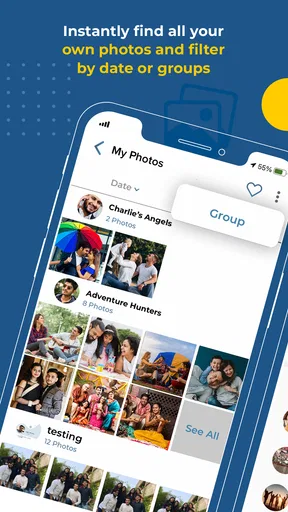
So, what makes Kwikpic different from the other photo-sharing apps out there? For starters, it’s got this sleek feature that automatically organizes your photos. No more endless scrolling or searching for that one special picture from last summer’s barbecue. The app uses smart algorithms to categorize your photos based on events, locations, and even people. It’s like having your own personal photo assistant. How cool is that?
But wait, there’s more! Kwikpic allows you to share photos and albums effortlessly. Just select the images you want to share, and you can send them off to your friends and family in a snap. The app even supports multiple formats, so you’re not stuck with just JPEGs. It really takes the hassle out of sharing memories.
Privacy and Security
In today’s digital age, privacy is a big deal, and Kwikpic seems to get that. I was relieved to find that the app offers robust privacy settings. You can control who sees your photos and even set expiration dates for shared albums. It gives you peace of mind knowing that your personal moments aren’t floating around the internet for longer than you want them to be.
Seamless Integration
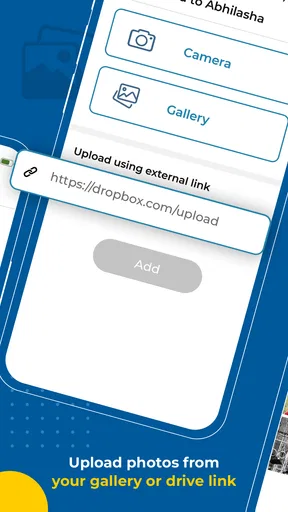
Another highlight of Kwikpic is its integration capabilities. Whether you’re using Google Photos, Dropbox, or another cloud service, you can easily sync your accounts for a more streamlined experience. This feature saved me a ton of time when I wanted to pull photos from different platforms into one cohesive album. It’s all about making life easier, right?
Room for Improvement
Of course, no app is perfect, and Kwikpic is no exception. While the app is great at organizing and sharing, I did notice that the editing tools were a bit basic. If you’re looking to do some serious photo editing, you might find yourself switching to another app. But for casual users, the basic cropping and filter options might be just enough.
Another small hiccup was occasional lag when uploading large batches of photos. Nothing too dramatic, but it’s worth mentioning if you’re planning on sharing a ton of images at once.
Final Thoughts
All in all, Kwikpic - Smart Photo Sharing is a solid choice for anyone looking to simplify their photo-sharing routine. It’s got a lot going for it, from its smart organizing features to its privacy controls. The app isn’t without its minor flaws, but they’re easily overshadowed by the convenience it offers.
If you’re tired of sifting through endless photos or struggling to share your favorite memories, give Kwikpic a try. It’s a handy little app that just might become your new best friend in the world of photo sharing. Happy snapping!
Pros
- Easy to use with intuitive interface.
- Seamless sharing with multiple platforms.
- Automatic photo organization feature.
- High-quality image uploads supported.
- Secure sharing with privacy controls.
Cons
- Limited editing tools available.
- Requires internet to access features.
- Frequent ads can be distracting.
- Basic version lacks advanced features.
- Occasional slow loading times.
FAQs for Kwikpic - Smart Photo Sharing
What is Kwikpic and how does it work?
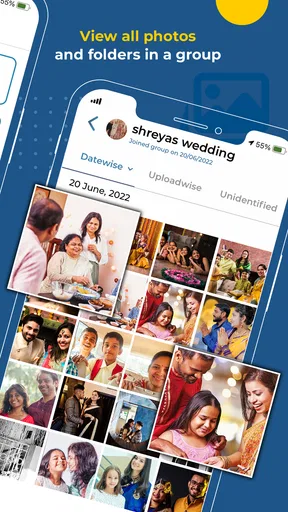
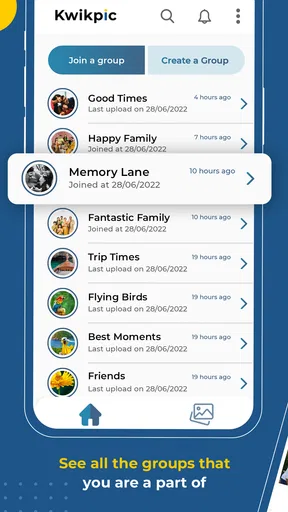
Kwikpic is a smart photo sharing app designed to simplify the process of sharing images with friends and family. The app uses AI technology to automatically sort and categorize your photos, making it easy to find and share them. Users can create albums, invite others to contribute, and set privacy controls for each album.
Is Kwikpic free to use, or are there any in-app purchases?
Kwikpic offers a free version with basic features that are sufficient for most users. However, there are premium features available through in-app purchases, such as expanded storage options and advanced editing tools. These enhancements can improve the user experience, but the core functionalities remain accessible for free.
What kind of privacy features does Kwikpic offer?
Kwikpic prioritizes user privacy by allowing you to control who can view and contribute to your photo albums. Each album can be set to private, shared with selected contacts, or made public. The app also uses encryption to secure your data, ensuring that your photos are protected from unauthorized access.
Can Kwikpic be used across different devices and platforms?
Yes, Kwikpic is available on both Android and iOS platforms, allowing you to seamlessly share photos across different devices. The app syncs your albums and photos in real-time, ensuring a consistent experience whether you're using a smartphone, tablet, or switching between operating systems.
Does Kwikpic offer any photo editing tools or filters?
Kwikpic includes a variety of basic photo editing tools and filters that allow you to enhance your images before sharing. Users can adjust brightness, contrast, and saturation, as well as apply artistic filters. For more advanced editing features, users can opt for the premium version of the app.


